Where This Came From思想来源
This talk began with one interview — the idea is not mine
Why it matters for this talk
Jobs are bundles of tasks, not indivisible wholes. Brynjolfsson argues that looking at whole occupations is the wrong level of analysis. A radiologist performs roughly twenty-six distinct tasks: reading images is one of them, and it is the one a model can do. Conducting a physical examination, weighing the wider clinical context and coordinating a patient's care are not. AI rarely eliminates an occupation — it reorganises the tasks inside it.
He splits work into three phases: define the problem, execute, and evaluate whether the output actually solved it. Execution is where the models excel. Defining the right question takes judgement and intent; evaluating the answer means catching what is confidently wrong. Both stay human.
And what gains value as execution gets cheap: agency — knowing what is worth doing; authentic connection and taste; and improvisation in the situations no training data covers.
If that sounds like the framework on the first tab, it should. Define and evaluate are what this talk calls keep and the human half of augment; execute is where automate lives. A teacher's week and a radiologist's are the same problem at a different scale — which is worth knowing at an economics conference, because it means this is a finding rather than a hunch.
The Framework框架
Sort every task in your week into one of three — before you decide on any tool
Automate
AI drafts it fully. A human still reads it and still sends it. The judgment is in the review, not the drafting.
Augment
The human decides; AI assists. The decision never leaves you — AI shortens the distance to it.
Keep
Stays human by design. Not because AI can't — sometimes because it shouldn't, and sometimes because it costs more than it saves.
The Audit, Worked Through审视示例
Six real tasks from one Economics teacher's week, after a year of building
Daily at-risk student tracking
A daily class pulse that surfaces the students who need attention today. The most useful thing on this list — and the one that carries the most data risk, which is why it leads straight into the compliance section.
MCQ marking
Scoring is pure SQL against a stored answer key — the model never marks anything. Scan cells that can't be read are flagged for a human, never guessed. Verified at 59/60 accuracy. The lesson generalises: when an answer is objectively checkable, check it with code, not a model.
Termly report writing
A year ago, the single biggest time sink of the term. Now a generated first draft in house style, which a teacher edits and sends. The clearest before-and-after on this list.
Essay and paper marking
AI drafts the feedback; the teacher arbitrates the final mark. The draft saves the blank page, not the decision.
Daily lesson planning
Still being built — deliberately included, because the framework has to hold for a half-finished tool as well as a polished one. If the sort only works in hindsight, it isn't a planning tool.
Slide and resource decks
Tried it. Abandoned it. Editing the AI's output cost more time than making the deck from scratch. Worth saying out loud at a conference full of AI enthusiasm: a task landing in "keep" is a real result, not a failure to try hard enough.
What Stays Human必须保留人工的部分
By design, not by limitation
Now Do Your Own动手审视你自己的一周
Sort your week, then take the list away with you
下面是教师一周中经常重复的任务清单。请按你自己的判断分类,而不是照搬我的分类。 可以添加你自己的任务,也可以删除不适用的项目。四个选项分别是: Automate 自动化、 Augment 辅助化、 Keep 保留人工、 N/A 不适用。完成后可一键复制;所有选择只保存在你的浏览器中,不会上传到任何地方。
When you're done, copy it out. Nothing is sent anywhere — your answers stay in this browser, and they'll still be here if you come back to this page later.
Before you paste it into anything
The list you copy contains no student information, so it is safe to paste anywhere. The moment you go on to build one of these, that changes — see China & Compliance before you put real marks, comments or names through a foreign-hosted tool.
If You Teach in China, Read This First在中国任教请先读这一节
PIPL, data residency, and where student work is allowed to go
Real student data changes the calculation
Marks, written comments and at-risk flags are personal information about minors. Putting them through a foreign-hosted AI tool is a PIPL question before it is a pedagogy question — and it is a question about your school's exposure, not only your own.
The practical rule that came out of a year of building: wherever real student data is involved, default to a domestic tool. Save the foreign models for work that contains no student information at all — planning, resource drafting, your own writing.
Three Rules That Survived the Year经得起一年检验的三条原则
What the compliance thinking actually reduced to
1. If the answer is objectively checkable, check it with code
MCQ scoring runs as a database query against a stored key. No model sees the answers, so no model can be wrong about them — and nothing identifiable leaves the machine.
2. Separate the data from the drafting
A report generator can write in your house style without ever being told a student's name. Strip the identifiers first and most of the compliance problem disappears with them.
3. Unreadable beats wrong
Anything the system can't read confidently gets flagged for a human rather than guessed. A blank you have to fill in costs a minute; a plausible wrong mark costs a great deal more.
The Full Guide完整指南
Everything above, at length — and how to check your own school
This is a plain-English guide to how China's data protection laws apply to the ordinary work of teaching — marking, sharing files, asking students to sign up to a website, building your own tools. It is written for teachers and school leaders, not lawyers.
Before you read any further
This guide is for staff awareness. It is not legal advice. It sets out how the law is generally understood and how to check your own situation — but for any formal decision, your school should take advice from someone qualified in Chinese data protection law.
Nothing here is an assessment of any particular school. Where it describes a common finding, it is describing a pattern across international schools in China, and giving you the means to check whether it applies to yours.
What's in here
- The four laws that matter
- What counts as personal data
- Cross-border transfers — the core problem
- Checking your own school in ten seconds
- Four things people get wrong
- AI, marking and feedback
- EdTech websites and student sign-ups
- Tools you build yourself
- Where to start
- Quick reference — is this allowed?
1 · The Four Laws That Matter
Why this applies to schools, and not only to tech companies
China has strict national law about how personal data — including student data — is collected, stored and moved. Since 2021 it applies fully to international schools operating in the mainland. The gap between common practice and legal requirement is one most international schools share, so this is not about blame. It is about making informed decisions rather than uninformed ones.
PIPL — Personal Information Protection Law 《个人信息保护法》
China's principal data privacy law, broadly comparable to the EU's GDPR. In force since November 2021. Sets the rules for collecting, storing and transferring personal data.
CSL — Cybersecurity Law 《网络安全法》
The foundational network security framework, in force since 2017. Requires important data collected in China to be stored in China.
Law on Protection of Minors 《未成年人保护法》
Extra protection for anyone under 18. Processing a minor's data requires explicit consent from a parent or guardian — not from the student.
Interim Measures for Generative AI (2023) 《生成式人工智能服务管理暂行办法》
Covers AI services operating in China. Directly relevant whenever staff put student work through an AI tool.
What PIPL actually requires
- Lawful basis — a legal reason to process the data. For schools, usually consent.
- Informed, explicit consent — for minors, written parental consent. Not implied, not a pre-ticked box.
- Purpose limitation — use it only for what you collected it for.
- Data minimisation — collect only what is strictly necessary.
- Data localisation — if the person is in China, their data stays in China unless a formal transfer mechanism exists.
- Records — keep processing records for at least three years.
- Breach notification — notify affected individuals and the regulator within a reasonable time.
The regulator is the Cyberspace Administration of China (CAC) 国家互联网信息办公室. Enforcement has so far concentrated on large technology platforms rather than schools — but the obligation exists regardless of who is currently being pursued, and enforcement priorities move. Penalties run to ¥50 million or 5% of annual turnover, with personal liability possible in serious cases.
2 · What Counts as Personal Data
More than most people assume
Under PIPL, personal information is anything that can identify a specific individual — alone, or combined with other information you hold. In a school that is a wide category.
Treated as sensitive, requiring the highest protection
Grades and assessment results · health and medical records · disciplinary records · and any data belonging to a student under 18, which is automatically classed as sensitive in its entirety.
Standard personal information includes full names, school email addresses, student ID numbers, class or group IDs, and parent contact details. All of it is covered, however harmless it looks.
The initials misconception
Using initials instead of full names does not change the legal position. In a classroom, where you can identify which student "W.Z." is, initials are still personal information. The test is whether a reasonable person in your position could identify the individual — not whether a stranger could.
3 · Cross-Border Transfers
The single largest source of non-compliance in international schools
Any time personal data belonging to someone in China reaches a server, company or individual outside the mainland, that is a cross-border transfer — including when it merely routes through Hong Kong. That covers saving a student's name to a database hosted abroad, uploading student work to a foreign AI, students creating accounts on foreign websites, and any app syncing to a foreign cloud service.
To do it lawfully a school generally needs specific parental consent, a documented impact assessment, and often a CAC-approved standard contract with the foreign recipient. Parental consent on its own is not sufficient — that catches many schools out.
4 · Checking Your Own School
The first thing to look at, and it takes ten seconds
For most international schools in China the largest single exposure is not an EdTech platform. It is the office suite — because it touches every teacher and every student, not one class or one department.
Microsoft 365 comes in two forms. The global version stores files in Hong Kong, Singapore, Japan or the United States — outside mainland China, and therefore non-compliant without a transfer mechanism. The version operated by 21Vianet, a licensed Chinese partner, stores data in Beijing and Shanghai and is compliant. Most international schools are on the global version, because it was easier to set up, cheaper, and deployed before PIPL existed.
How to tell which one you are on
- Check the login URL. Sign in and look at the address bar.
login.microsoftonline.commeans your data is outside China.login.partner.microsoftonline.cnmeans it is inside. - Check OneDrive settings → Options → look for Data location or Region. "China" or "21Vianet" is inside; "Asia Pacific", "Hong Kong", "Singapore", "US" or "Global" is outside.
- Check the desktop app. "OneDrive for Business" is the global version; "OneDrive for Business operated by 21Vianet" is the China one.
- Ask IT directly: "Is our Microsoft 365 tenant the global version or the 21Vianet-operated China version?" If they are not sure, that uncertainty is itself the finding.
If it turns out to be the global version, then every spreadsheet of grades, every document with a student name, every Teams chat and every SharePoint folder is sitting outside China. The point of checking is not to produce alarm — it is that a school cannot make a decision about a risk it has not measured. The available responses are to migrate to 21Vianet, to adopt China-hosted document platforms such as Tencent Docs or Alibaba Docs for anything containing student data, or to formally and knowingly accept the risk in writing. All three are legitimate. Not knowing is not.
A worked example of doing this properly
ManageBac is a case where the question has a documented answer. Faria have confirmed that school
environments on the .cn domain are hosted on servers within China, under ICP licence
17051512, with an Information Classified Security Protection Certificate. Their security
documentation is published at faria.org/secure.
Two caveats worth copying as a method. This applies only to the .cn
domain — a school on the global domain is in a different position. And you should ask for a
Data Processing Agreement in writing and keep it. That is what a verified vendor looks like: a
named legal entity, a licence number, a written confirmation, and a document in your file.
5 · Four Things People Get Wrong
Each of these is a common and confident mistake
"We route through Hong Kong, so we're fine"
Under Article 38 what matters is the final destination of the data, not the route it takes. A Hong Kong proxy is a connectivity workaround, not a legal safeguard.
"It's a .cn domain, so the data is in China"
A .cn address is a web address. A foreign company can use one for a CDN node or a
localised login page while its databases stay abroad. To be satisfied, ask three questions: are the
core databases physically in the mainland, is a licensed Chinese entity the data controller, and is
there a PIPL-compliant Data Processing Agreement? Without documented answers to all three, assume not.
"I did it on my own laptop, on my own VPN"
If the work is school work, the school's obligations follow it. Using a personal VPN to put student work through a foreign AI service on a personal device is still processing student data through a foreign service. The device and the network are not the deciding factor.
"We were audited a few years ago and we were fine"
Any audit predating November 2021 reflects the law before PIPL came into force. PIPL changed the requirements substantially. An older audit provides no ongoing cover.
6 · AI, Marking and Feedback
Where this touches teaching most directly
The rule here is simple. Putting student work through a foreign AI service is a cross-border transfer. ChatGPT, Claude, Gemini and Copilot all run on servers outside China, and reaching them through a VPN does not change that. There is no data processing agreement, no parental consent for that specific transfer, and generally no way to have the data deleted afterwards.
Domestic services — Baidu Wenxin Yiyan, Alibaba Tongyi Qianwen, Tencent Hunyuan, Moonshot's
Kimi, DeepSeek and other CAC-registered providers — keep the processing inside the mainland,
so no transfer occurs. A useful shorthand: if the API endpoint is a .cn domain and the
service expects Chinese ID verification and payment in CNY, it is operating inside the domestic
framework.
The part most people miss, in their favour
Using a foreign AI tool to write lesson plans, worksheets or teaching materials — with no student data in the prompt — raises no PIPL issue at all. The obligation attaches to the student's personal information, not to the tool.
So the practical line is not "foreign AI is banned". It is: foreign models for your own work, domestic models the moment a student's name, work or grade is involved.
One further distinction worth knowing: an enterprise API plan from a domestic provider usually carries data protection terms that the consumer chatbot does not. For anything school-wide, the API route is the one to take.
7 · EdTech Websites and Student Sign-Ups
When you direct students to a platform, the data flow becomes the school's responsibility
A student "choosing" to sign up does not shift the obligation. For each platform students are directed to use, the school is expected to carry out an impact assessment beforehand, tell parents what the platform is and where the data goes, obtain separate explicit consent for the transfer, have a lawful transfer mechanism in place, and record the platform in a data register.
School email addresses are personal information, so a student signing up with one is itself a transfer. Single sign-on is no different — it passes the student's unique identifier to the third party.
"But every international school uses these tools"
True, and it does not change the legal position. Widespread non-compliance is not permission, and regulators have a habit of tolerating a grey area and then making an example of one case.
The realistic path is not to switch everything off tomorrow. It is to start a documented process: audit what is already in use, get proper consent for the tools that matter most, and review anything new before students are pointed at it.
Two things that genuinely reduce the risk
- Student-initiated use. If a student finds and uses a site entirely on their own, the school's exposure is much lower. The question is whether the school created the context in which they encountered it. If you linked it, set it, or built it into the course, you own it.
- Username-only sign-up. A self-chosen username with no real name or school email is materially lower risk — but "no email required" is not the same as "no personal data collected". Plenty of free platforms monetise behavioural data. Read the privacy policy first.
The single most useful thing to build: a vendor list
One document recording every platform students are asked to use, its country of registration, what data is shared, and whether consent has been obtained. Most schools have no such list, which means no one can answer basic questions about their own exposure. It is low effort and it makes every subsequent decision possible.
8 · Tools You Build Yourself
Higher obligations, because you become the data controller
Teachers increasingly build their own tools — gradebooks, browser extensions, tracking apps. These carry every obligation a purchased platform does, and arguably more, because the school and the person who built it become responsible for the data.
A real example, and it was mine
A gradebook app I built was syncing student first names, class IDs and initials to a Supabase database. Supabase is hosted outside China. Even that minimal data — enough to identify specific students in context — made it an unlawful cross-border transfer. The app came offline once I realised.
The lesson is not "don't build things". It is that the compliance question belongs at the architecture stage, when it costs nothing, rather than after you have built something you then have to switch off.
What a compliant build looks like
- Keep the data local or domestic. A local SQLite database on the device, or a China-region cloud database. If devices need to sync, peer-to-peer between school machines avoids a foreign server entirely.
- Get specific, documented parental consent. A general IT policy does not cover it. Name the app, say what it collects and why, say where it is stored, and use an active opt-in.
- Do an impact assessment before it touches student data. It does not have to be long. It has to exist.
- Keep a three-year log of access and changes. A table in the same local database is enough.
- Avoid foreign backends. Supabase, Firebase and non-China AWS regions are all outside the mainland.
No-code builders are the quiet trap
Glide, Bubble, Adalo, AppSheet and similar are almost always hosted in the US or EU. Building a student-data app on one is non-compliant unless it offers a China-hosted option. Check where the data lives before you put a single student on it — the convenience of no-code does not change the transfer rules.
9 · Where to Start
Ordered by effort against urgency
This week — low effort, high value
- Check which Microsoft 365 tenant your school is on. Ten seconds, and it tells you the size of the largest question.
- Take any staff-built tool that syncs student data to a foreign server offline, or disable the sync.
- Pause new student sign-ups to foreign platforms until there is a way to review them.
- Agree who owns this. A named person, not a committee.
- Ask staff to stop putting student work through foreign AI services until there is an approved list to point them at.
This term — needs coordination
- Build the vendor list: every platform, its country, the data shared, the consent status.
- Draft a parental consent form and privacy notice for the platforms that matter most.
- Publish a digital tools page for parents, naming the core platforms and linking their privacy policies.
- Issue an approved list of domestic AI tools, so "don't use that one" comes with "use this instead".
- Look at whether enrolment agreements say anything about cross-border use of EdTech.
- If the office suite is the global version, cost out the alternatives before the decision is needed.
Ongoing
- A review step before any new platform requiring student login is adopted.
- Impact assessments for the major processing activities.
- Three-year processing logs on the key systems.
- Staff-built tools held to the same architecture standard as purchased ones.
10 · Quick Reference
Is this allowed?
| Scenario | Allowed? | Why |
|---|---|---|
| Putting student work through a foreign AI for marking | No | Foreign server, no consent, data may train the model |
| Putting student work through a domestic AI via a school API | Yes | China server, enterprise terms |
| Using a foreign AI to write a lesson plan, no student data | Yes | No personal information involved |
ManageBac on the .cn domain | Yes | Verified China servers, ICP licensed |
| ManageBac on the global domain | No | Hosted outside the mainland |
| Student grades in a local file on your laptop | Yes | No cloud sync; keep it encrypted |
| Student grades in OneDrive, global tenant | No | Foreign server unless 21Vianet |
| Student grades in Tencent Docs or Alibaba Docs | Yes | China server |
| Students signing up to a foreign platform with school email | No | Foreign server, no transfer mechanism |
| A Hong Kong proxy to reach foreign sites for research | Partly | Fixes access, not data localisation |
| Building a school app on a foreign backend | No | Foreign server |
| Building a school app on a China-hosted backend | Yes | China server, with consent |
The Tools工具
Built for my own week, shared as they are
vercel.app address. Included for
completeness, but this one is blocked in mainland China — which is
exactly why the link above exists. Use it if you are reading this from outside.Read this before you dictate anything about a student 用它写学生相关内容前请先读
Dictation is close to a perfect augment: the words are yours, the judgement is yours, and the machine only saves you the typing. But the audio has to go somewhere, and with this tool it goes a long way.
From Wispr's own security FAQ: "All customer data is processed and stored in the United States regardless of user location; Wispr operates no European or other regional processing location." There is no on-device mode on any platform. Their stated compliance list covers GDPR, CCPA, HIPAA, SOC 2 and ISO 27001 — PIPL is not on it.
So the sentence you speak is the thing to control, and it is the same rule my report generator already enforces in writing: no name, no gender, no pronoun standing for the pupil. "Needs to show the working before the final answer" is a sentence about nobody. Put a student's name in front of it and you have made a cross-border transfer of personal data, out loud, in a language your phone understands perfectly well.
Two settings worth changing on day one, both in the app: turn Privacy Mode on — confusingly labelled "Improve the model for everyone", so you are turning that off — and turn Dictation cloud storage off. Together those mean no training on your audio and nothing kept on their servers. Privacy Mode is off by default, so this is opt-out, not opt-in.
And from the mainland it needs a VPN, like everything else in this group.
录音全部在美国处理与存储,无本机模式,其合规清单不含PIPL。 因此关键在于你说了什么:不提姓名、不提性别、不用代指学生的人称代词 — 与我的报告生成器规则相同。 建议首日即开启 Privacy Mode(设置中显示为"帮助改进模型",需关闭该项)并关闭 Dictation cloud storage。内地使用需VPN。
Running AI On Your Own Laptop在本机运行 AI
Free, private, and the only option where nothing leaves the machine at all
Engine, harness, and why the difference matters
Ollama runs a model on your computer. It downloads the model, keeps it, and gives you somewhere to type. That is the whole job. It is the engine.
A harness is the program around the model that can actually do things — open your files, edit them, run commands, search the web, remember what you did yesterday. The harness holds the tools; the model only decides which to use. bolt.diy is a harness. So is Claude Code. Ollama is not.
So on its own, Ollama cannot make or edit a file. It can write you the contents of one, which you paste in yourself. To have it edit files directly, you point a harness at it — and most harnesses have a setting for exactly that, because Ollama exposes the same kind of connection a paid provider does.
简单地说:Ollama 是“引擎”,不是“整车”。它只负责在你的电脑上运行模型并提供对话界面, 本身不能直接创建或修改文件,也不能联网搜索。要让模型真正操作文件,需要在它之上再加一层 “工作框架”(harness),例如 bolt.diy。
What it is genuinely good at
Rewriting a worksheet at a lower reading level. Summarising something long. Drafting comments and messages. Translating. Turning messy pasted text into a clean table. Generating practice questions from material you supply. In other words: most of the language work in a teaching week.
And the compliance position is the simplest available anywhere on this site. The model is on your laptop and the text never leaves it, so there is no transfer, no third party, and nothing to consent to — even with real student work in front of you. It is the one place where "can I put student names in this?" has an easy yes.
What it is not good at, and what it costs you instead of money
It is weaker than the paid models. A model small enough to run on a laptop is not as sharp as one running in a data centre. Expect competent rather than excellent, and expect to do more editing.
It knows nothing recent and cannot look anything up. No web access unless a harness gives it some. Never rely on it for facts, figures or anything current — use it to work on text you have provided.
It needs memory. A rough rule: your computer's RAM in gigabytes is about the largest model you can run comfortably. 8GB runs the small models slowly; 16GB is workable; 32GB or more is comfortable. Apple Silicon Macs do well here.
It cannot touch your files by itself. See above — that needs a harness.
Finding the Current Best Model如何找到当前最好的模型
Which changes monthly, so these are places to look rather than names to remember
People Worth Following值得关注
Where to go once you know what you want to build
Three Places to Start三个起点
Ranked by lowest risk and highest time saved — each step adds exactly one risk
1. Build teaching material out of real-world data
Nothing about a student is involved, so there is no PIPL question, nothing to ask permission for, and no way to cause harm. You can start this afternoon.
Two things I do here. The dispatch on this site finds three economics stories every weekday and draws the syllabus links — it runs on a schedule and I read it with my coffee. And over one summer I built Paper 2 and Paper 3 practice for both my sites by taking real news articles and generating data-response questions from them. Textbook data is out of date the day it prints; a story from this week is not, and students notice the difference.
The same move covers rewriting a textbook example for where you actually teach — the UK petrol-duty example becoming a Shanghai congestion-policy example.
A worked Paper 2, built this way → — the full data response, plus the twenty-minute method behind it.
2. Automate something objectively checkable — with code, not AI
Now real student data is involved, so it stays on your machine. But no model goes near it, which means the things that can go wrong are ordinary bugs rather than confident wrong answers.
This one is on the list because of a failure. I once ran a multiple-choice analysis for a class through an AI chat and got back a tidy, confident report that listed a student as wrong on four questions the mark scheme — and that student's own answers — showed as correct. Nothing about the output looked wrong. Now the answer key is parsed by pattern-matching, never by a model, and every score is a database query. The model only transcribes handwriting, and unreadable cells get flagged rather than guessed: hand-checked at 59 out of 60 on real scans, with the one miss coming back flagged.
You do not have to build what I built. The transferable part is the rule: if an answer is objectively checkable, check it with code. Reaching for a model turns a solved problem back into a probabilistic one. How that works →
3. Draft the writing you do every term — and never let it send
The biggest single time saving, and the one that needs the most care, because now a model does see student work. So it must be a domestic model, and a person must press send.
Report comments are the clearest case. My generator has the school's house style written into it as rules rather than hoped for in a prompt: exactly three strengths and two to three areas for development; no name, no gender, no pronouns standing for the pupil; every target in two parts joined by "by" — what to improve by concrete action; British spelling; "Home Learning", not "homework". It generates around eight candidates of each, I tick the best, and it exports to Word.
A compliance checker runs over the output, and it has two tiers on purpose. A gendered pronoun or a target missing its "by" half is an error. Plural pronouns and US spellings are only warnings — because the first real test flagged "policies and their implications", which is correct English and perfectly compliant. Flagging that as an error would have trained me to ignore the warnings, and a checker you ignore is worse than no checker.
The same shape covers feedback comments and messages about missing work. In every case the app drafts and copies to the clipboard. There is no send button anywhere in it, and the credentials that would make one possible are not in the app.
Two Test Makers两个试卷生成器
Built in two days — a worked example of starting point one, and of what it costs
Paper 1 — 2,062 multiple-choice questions, each tagged to a syllabus unit
Sixty-nine Cambridge IGCSE Economics 0455 Paper 1 papers, June 2016 to June 2026. Every question is cut to its own image and carries three labels: the syllabus unit it tests, the series it came from, and the correct answer.
What that unlocks is ordinary and useful. Tick the units you have taught. Set a length. Choose printable paper or an on-screen quiz that marks itself as the student clicks. Two filters are the ones a teacher actually reaches for and no generic question bank has: hold back a series, so the papers you are saving for the mock never appear in a Tuesday starter; and name the class, so it will not hand that class a question it has already had.
There is also a filter for whether a question carries a diagram or table — which exists because reading a supply-and-demand graph and recalling a definition are different skills, and some weeks you want to drill one and not the other.
Paper 2 — 1,680 question parts, and a question that never existed
Seventy Paper 2 papers over the same decade, but tagged at a finer grain: not 70 papers or even 350 questions, but 1,680 individual parts, each with its mark value (2, 4, 6 or 8), its syllabus unit, and its mark scheme attached.
It will serve you whole past questions exactly as printed. The reason it exists is the other mode: it assembles a question that has never been sat, by taking a 2-mark part from one year, a 4-mark from another, a 6 and an 8 from two more — and constraining the result to what you have actually taught. You choose how strict that is: the 8-mark part must be in your units, or both the 6 and the 8, or any part, or all four.
Two constraints stop that producing nonsense, and they are the part worth stealing. It compares the wording of each candidate part against the parts already chosen and rejects anything with more than about half its significant words in common — so you never get a paper asking essentially the same question twice in different clothes. And it prefers parts from different syllabus units, so a 20-mark question ranges rather than circling one topic.
It builds to either shape: the 2027 shape of six parts and 20 marks, or the current eight parts and 30 marks. That was the actual reason for building it — the syllabus changes and a decade of past papers is suddenly the wrong shape.
Why there is no download button 为何本站不提供下载
Between them these two tools hold roughly 4,800 images cut from 139 Cambridge question papers and their mark schemes. That is close to the whole back catalogue of 0455 Papers 1 and 2, mark schemes included.
Past papers and mark schemes are Cambridge's copyright. A centre may use them to teach its own candidates; that is what these tools do, on one laptop, for my classes. Putting them on a public website is republication, and it is not mine to give away — not for a conference, not for free, and not with a credit line. So this page describes them and does not host them. I would rather say that plainly than quietly not mention it.
It also happens to be the honest version of the advice on this whole site: the compliance tab argues that you should know what you are copying and where it goes. That argument does not get an exemption when the thing being copied is convenient for me.
这两个工具包含约4,800张剪自139份剑桥真题及评分方案的图片, 几乎是0455试卷一与试卷二的全部存档。真题与评分方案的版权归剑桥所有:考点可用于教授本校考生, 但公开发布属于再出版,不在我可以给予的范围内。因此本页只作说明,不提供下载。
Build your own — the part that actually transfers 自行搭建
Your centre already has legitimate access to your own board's papers. Build it from those and it is yours, it fits your syllabus, and nobody has to give you permission. Two days, most of it spent on step three.
- Get the papers as PDFs from your board's teacher portal — the ones your centre is entitled to.
- Cut each question to an image. Boring, scriptable, done once.
- Tag every question with its syllabus unit, mark value, series, and answer or mark scheme. This is the entire job. Everything the tool can do later is decided here, so tag for the questions you will want to ask: by unit, by mark value, by whether there is a diagram.
- Save the tags as one plain data file. No database, no server, no accounts.
- One HTML page that filters that file and prints. It opens by double-clicking it, works on a plane, and nothing leaves the laptop — the same local-first shape as everything else on this site. Why local-first →
- Then add the two teacher features no commercial question bank has: hold back a series for the mock, and remember what each class has already been given. They take an afternoon and they are the reason you will keep using it.
If a model helps you here, notice where: it is useful for the tedium of cutting and tagging, and for writing the filter page. It is not writing questions, and it is not marking anybody. That is the sort the whole talk is about.
用你所在考点有权使用的真题自行搭建:切图、标注、 一个本地HTML页面。标注是全部工作量所在。
Graphic Organisers图形组织器
A prompt builder you can use on this page, and two sheets it was written to produce
Which image tool, and what it costs 用哪个工具,花多少钱
I made the two sheets below myself in Nano Banana, with help refining the wording of the prompt. My school pays for several AI platforms and that is one of them — which is exactly the sort of access most teachers do not have, so it is worth saying plainly rather than demonstrating something you cannot go home and repeat.
The free route is Google NotebookLM. If you have a Google account you already have it, and it will generate this kind of sheet at no cost. The generator above does not care which one you use — it writes the prompt, you paste it wherever you can.
From the mainland, both need a VPN. Google accounts and NotebookLM are not reachable without one, so treat this as a tool for when you have that access rather than a Monday-morning one.
下方两张表由我本人用 Nano Banana 制作(学校购买了该平台)。 免费替代方案是 Google NotebookLM:有谷歌账号即可使用,效果相当。 注意:两者在内地均需VPN。
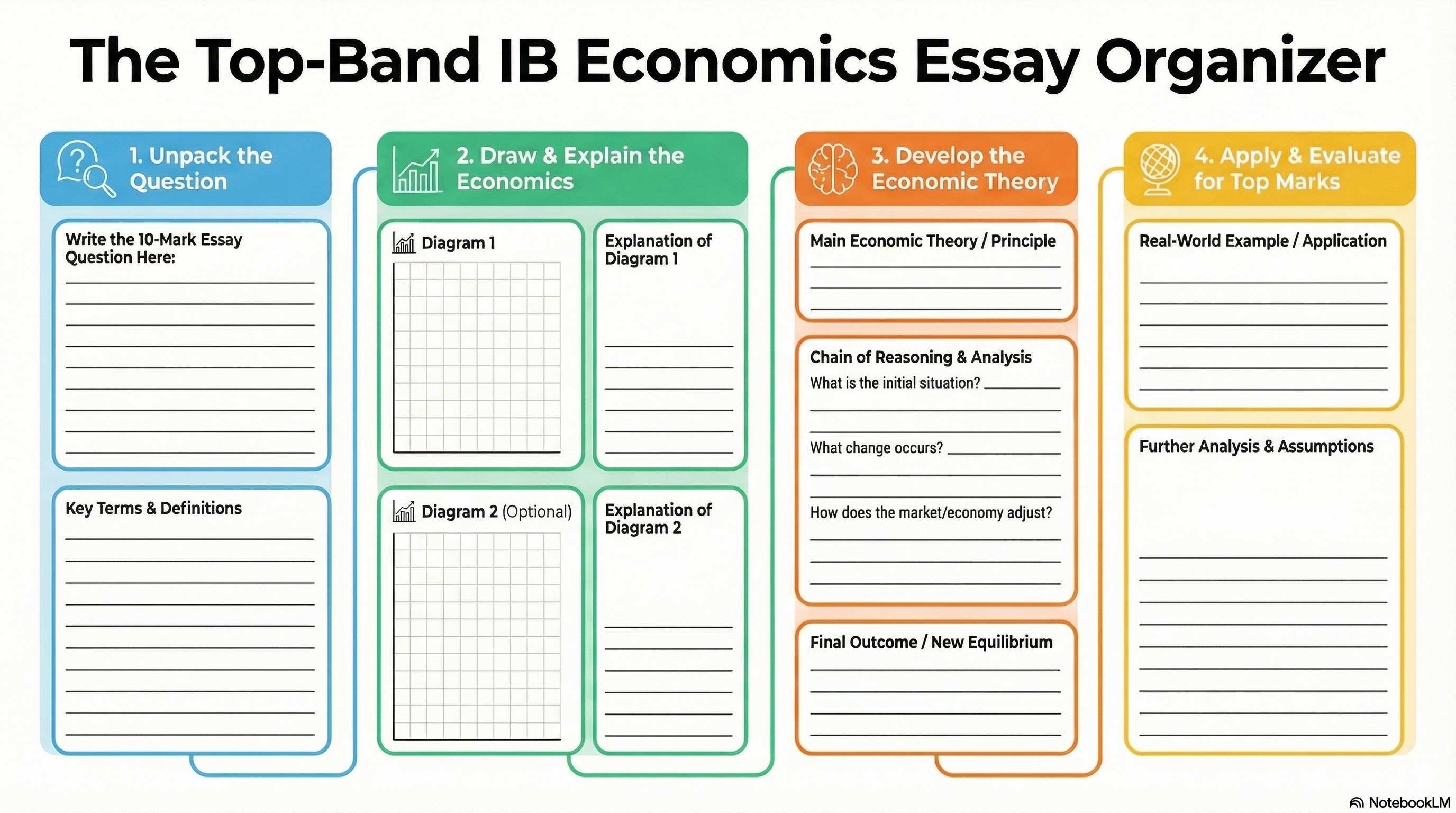
The 10-mark answer
Unpack the question → draw and explain the diagram → develop the theory → apply and evaluate. Four columns, in the order a good answer is actually built.
Full size for printing → · A3 works best
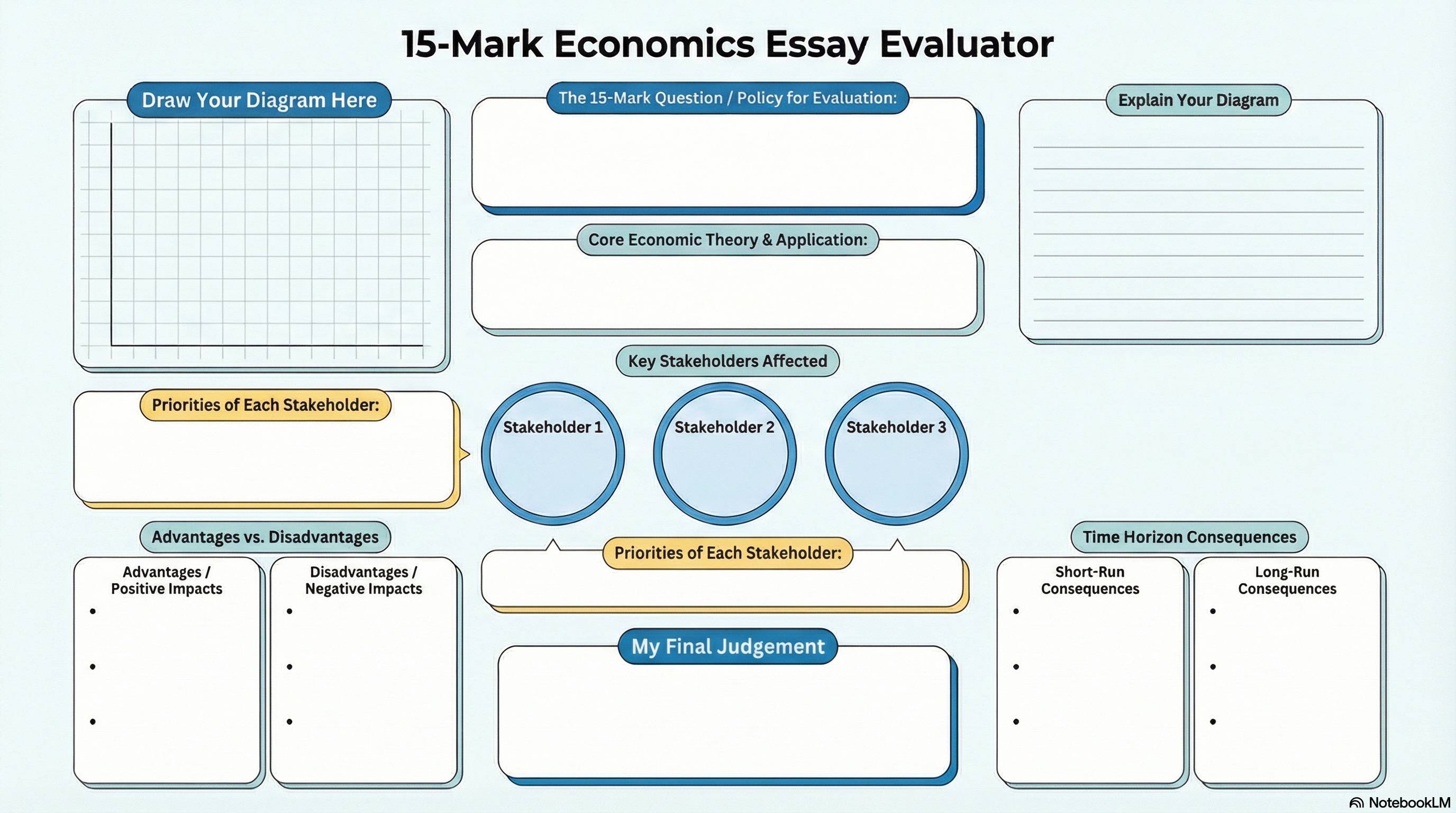
The 15-mark answer
Built around the thing candidates lose marks on: stakeholders, advantages against disadvantages, short run against long run, and a final judgement that has to be written down.
Full size for printing → · A3 works best
Carry On the Conversation保持联系
Scan either code in WeChat — questions after today are welcome
Group: Automate Augment Keep
The group for this talk. Post what you automated, what you kept, and what went wrong.
WeChat group codes expire every seven days, so this one is refreshed
periodically. If it will not scan, add me on the right and I will add you.
群二维码每七天失效,会定期更新;若无法扫描,请先加我,我拉你进群。
Nick Marsh 马喜
Add me directly. A note saying which school you teach at helps — I get a lot of requests after these things.
Happy to talk through any of this, in English or Chinese.
中英文皆可,欢迎交流。
Get a Heads Up 教师之间
覆盖中国与全球。这是我接下来要做的项目,也是今天之后保持联系的最好方式。
Nick Marsh
Nick Marsh teaches IB Diploma and IGCSE Economics at YCIS Puxi, Shanghai, where he also leads the Commerce department. Over the past year he has built a suite of teaching tools — including a ManageBac Chrome extension, a gradebook, reporting, tracking and lesson planning app, two China-based websites for IB and IGCSE Economics, and apps for essay and MCQ feedback. These have all been designed around a deliberate decision about what AI should automate, what it should assist with, and what must stay entirely human.
马喜任教于上海耀中国际学校(浦西校区),教授IB Diploma与IGCSE经济学课程,同时担任商科组负责人。过去一年,他开发了一系列教学工具——包括一款ManageBac浏览器插件、一套集成绩册、报告撰写、学情追踪与课程设计于一体的应用系统、两个分别服务于IB与IGCSE经济学、面向中国本土师生的网站,以及用于论文与客观题反馈批改的应用。这些工具的设计始终遵循一个明确原则:清楚界定哪些工作应由AI自动完成、哪些应由AI辅助、哪些必须完全保留人工。